
Digital eye strain is the tired, dry, achy, or blurry-eyed feeling many people get after long stretches on a computer, phone, or tablet. Eye doctors also call it computer vision syndrome [AOA, Computer Vision Syndrome]. It is common and genuinely uncomfortable, but it is not a sign that your screen is harming your eyes: device use does not damage the eyes permanently, though staring at a screen for a long time can cause temporary discomfort [AAO, Digital Devices and Your Eyes, 2023].

Most of the strain comes from how screens are used, not from the light they give off. People blink less while concentrating, hold their focus at close range for long periods, and often work with glare, small text, or a badly placed screen [AAO, Digital Devices and Your Eyes, 2023] [AOA, Computer Vision Syndrome]. The fixes that help most are simple: regular breaks, fuller blinking, a better-arranged screen, and an up-to-date eye exam. Symptoms that keep coming back, or that appear away from screens, deserve a closer look by an optometrist or ophthalmologist.
What is digital eye strain?
The American Optometric Association (AOA) describes digital eye strain as a group of eye- and vision-related problems that result from prolonged use of computers, tablets, e-readers, and phones. Discomfort tends to rise with screen time, and people who spend two or more continuous hours at a screen every day are at greatest risk [AOA, Computer Vision Syndrome]. Estimates suggest it may affect 50% or more of computer users, although studies define and measure it in different ways [Review in BMJ Open Ophthalmology, 2018].
“External” symptoms, such as burning, irritation, tearing, and dryness, are closely tied to dry eye. “Internal” symptoms, such as strain, aching, and headache behind the eyes, are linked to the effort of focusing up close and keeping both eyes working together [Review in BMJ Open Ophthalmology, 2018]. So one person gets relief from blinking and drops, another from new glasses.
Digital eye strain symptoms
Common symptoms include [Mayo Clinic, Eyestrain: Symptoms and Causes, 2024] [Review in BMJ Open Ophthalmology, 2018]:
- Tired, sore, aching, or burning eyes
- Dry or irritated eyes, or eyes that water
- Blurred vision that comes and goes
- Trouble refocusing when you look up from the screen
- Headache
- Sensitivity to bright light or glare
- A sore neck, shoulders, or back
- Trouble concentrating, or a feeling that you can’t keep your eyes open
Sudden double vision, however, needs prompt medical care rather than a screen break [MedlinePlus, Eye Emergencies, 2025].
Most symptoms ease once you stop. Some people notice lingering distance blur, and if the cause isn’t addressed, symptoms tend to return and may worsen [AOA, Computer Vision Syndrome].
Why screens make your eyes tired
Screen text is often less sharp than print, contrast is lower, glare is common, and viewing distances and angles differ from ordinary reading [AOA, Computer Vision Syndrome].
You blink less, and less completely
People normally blink about 15 times a minute, and that rate can drop by half while staring at screens or doing other close work such as reading [AAO, Digital Devices and Your Eyes, 2023]. Each blink spreads a fresh tear film across the eye; fewer blinks give it more time to thin and evaporate, causing much of the burning, dry feeling.
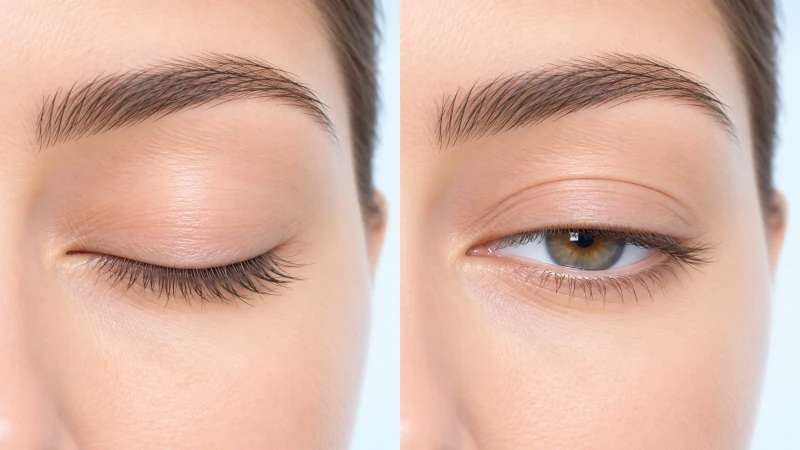
Concentration matters too: harder reading material lowers blink rate on paper as well as on a tablet. Incomplete blinks, where the upper lid doesn’t cover the whole front of the eye, may matter even more, and one study found a larger share of them during tablet and computer reading than with paper [Review in BMJ Open Ophthalmology, 2018].
Your eyes hold close focus for long stretches
Seeing up close keeps the eye’s focusing muscles working and the eyes turned slightly inward, which over hours can leave them strained and slow to refocus. A 2018 review concluded that these focusing complaints seem to come from demanding near work in general rather than from screens specifically [Review in BMJ Open Ophthalmology, 2018].
Glare, contrast, small text, and lighting
Glare from windows or overhead lights, low contrast, and small text all make the eyes work harder [AOA, Computer Vision Syndrome] [Mayo Clinic, Eyestrain: Diagnosis and Treatment, 2024]. In laboratory studies, small fonts and low contrast were also linked to lower blink rates [Review in BMJ Open Ophthalmology, 2018].
Screen position and posture
People whose glasses aren’t designed for computer distance may tilt their heads or lean toward the screen, which can lead to neck, shoulder, or back pain [AOA, Computer Vision Syndrome]. A desktop monitor viewed straight ahead also keeps the eyes open wider than looking down at a book, exposing more of the eye’s surface to drying air [Review in BMJ Open Ophthalmology, 2018].
Dry, moving air
Air from a fan, heater, or air conditioner blowing across your face dries the eye surface faster [Mayo Clinic, Eyestrain: Symptoms and Causes, 2024], and office air is often low in humidity [Review in BMJ Open Ophthalmology, 2018].
An uncorrected or outdated prescription
Uncorrected or under-corrected vision problems are major contributors. Farsightedness, astigmatism, focusing or eye-coordination problems, and presbyopia (the gradual, age-related loss of close-up focusing) can all add to symptoms, and a prescription that works for driving or reading may not suit your screen distance [AOA, Computer Vision Syndrome]. In controlled studies, even small amounts of uncorrected astigmatism reduced comfort at the computer [Review in BMJ Open Ophthalmology, 2018]. Screens often reveal a vision problem rather than cause one.
The two overlap heavily. Reduced and incomplete blinking can dry the eye surface, and dry eye is considered a major contributor to digital eye strain. If you already have dry eye, long screen sessions tend to make it more noticeable, and treating even mild dry eye can substantially improve comfort at the screen [Review in BMJ Open Ophthalmology, 2018].
They are still different problems. Digital eye strain includes focusing symptoms, such as headache and slow refocusing, that dryness alone doesn’t explain, and dry eye disease can cause symptoms with no screen involved. If burning, grittiness, or vision that blurs and clears continues away from screens, our guide to dry eye syndrome causes and treatment covers eyelid problems, artificial tears, and medical options.
What actually helps digital eye strain
These low-risk comfort measures target the known causes. Their support comes mostly from professional guidance and small studies, so expect fewer and milder symptoms, not a guarantee.
Take regular visual breaks: the 20-20-20 rule

Every 20 minutes, look at something about 20 feet away for at least 20 seconds [AAO, Digital Devices and Your Eyes, 2023] [AOA, Computer Vision Syndrome]. The AOA also suggests resting your eyes for 15 minutes after two hours of continuous computer use [AOA, Computer Vision Syndrome].
The rule is a practical habit, not a proven medical treatment, and it has been studied only lightly. In one small before-and-after study, 29 computer users with symptoms received software reminders to follow it. After two weeks their eye strain and dry-eye symptoms had decreased, but the improvement was gone a week after the reminders stopped, and tear-film measurements did not change [Study in Contact Lens & Anterior Eye, 2023].
The exact numbers aren’t magic; regularly relaxing your focus is the point, and frequent short breaks can ease symptoms without hurting productivity [Review in BMJ Open Ophthalmology, 2018]. Use a timer, and count tasks that take your eyes off the screen, such as a phone call [AOA, Computer Vision Syndrome].
Blink fully and often
Eye-care groups advise blinking more often on purpose at the screen [AOA, Computer Vision Syndrome] [Mayo Clinic, Eyestrain: Diagnosis and Treatment, 2024]. Evidence that this helps is limited: in one study, a beep prompting a blink every four seconds did not improve symptoms, and researchers suggest complete blinks may matter more than frequent ones [Review in BMJ Open Ophthalmology, 2018]. Now and then, especially when your eyes feel dry, close them gently but fully a few times. It’s a comfort habit, not an exercise program.
Position your screen and your chair

- Distance: roughly an arm’s length. The American Academy of Ophthalmology (AAO) suggests about 25 inches [AAO, Digital Devices and Your Eyes, 2023]; the AOA suggests 20 to 28 inches [AOA, Computer Vision Syndrome].
- Height: slightly below eye level, so you look a little downward rather than straight ahead or up. The AOA puts the screen’s center 15 to 20 degrees below eye level, about 4 to 5 inches [AOA, Computer Vision Syndrome]; Mayo Clinic suggests the top of the screen at or just below eye level [Mayo Clinic, Eyestrain: Diagnosis and Treatment, 2024].
- Placement: directly in front of you, with papers on a document holder near the screen so your eyes and head don’t keep shifting [Mayo Clinic, Eyestrain: Diagnosis and Treatment, 2024] [AOA, Computer Vision Syndrome].
- Chair: adjusted so your feet rest flat on the floor. If you keep leaning in or tilting your head to see, your glasses may not suit the screen distance [AOA, Computer Vision Syndrome].
Phones are often held close, with small fonts [Review in BMJ Open Ophthalmology, 2018]. Enlarge the text rather than pulling the phone closer.
Cut glare and adjust brightness, contrast, and text size
- Angle the screen so windows and overhead lights don’t reflect in it; close blinds in strong sun and avoid placing the monitor directly in front of a window [Mayo Clinic, Eyestrain: Diagnosis and Treatment, 2024].
- Try fewer overhead lights and an adjustable desk lamp [Mayo Clinic, Eyestrain: Diagnosis and Treatment, 2024].
- Use a matte or anti-glare filter if you can’t fix the light source, and keep the screen clean [AAO, Digital Devices and Your Eyes, 2023] [AOA, Computer Vision Syndrome].
- Enlarge the text and set brightness and contrast to a comfortable level [Mayo Clinic, Eyestrain: Diagnosis and Treatment, 2024].
Keep dry air off your eyes
Use a humidifier, move away from vents and fans, and avoid smoke [Mayo Clinic, Eyestrain: Diagnosis and Treatment, 2024].
Nonprescription artificial tears can help relieve and prevent dryness [Mayo Clinic, Eyestrain: Diagnosis and Treatment, 2024], and in studies of sustained computer work they reduced tiredness and dryness, though not always completely [Review in BMJ Open Ophthalmology, 2018]. Choose lubricating drops rather than “get the red out” drops, which may worsen dryness. Preservative-free drops can be used as often as needed; preserved drops can cause sensitivity if used more than four times a day [Mayo Clinic, Eyestrain: Diagnosis and Treatment, 2024]. Our section on choosing and using artificial tears goes further.
Only sterile products made for the eye belong in it. Our overview of safe home care for common eye problems explains why homemade and herbal eye washes are risky.
If you wear contact lenses
Contacts can increase dryness and irritation, and switching to glasses for long computer sessions can help [AAO, Digital Devices and Your Eyes, 2023]. In one study, contact lens wearers using a computer six or more hours a day were more likely to report digital eye strain than non-wearers [Review in BMJ Open Ophthalmology, 2018]. If lenses become uncomfortable at the screen, or you need drops constantly, ask your optometrist or ophthalmologist about lens type, fit, and wearing schedule rather than changing them on your own. A red, painful eye needs prompt medical care [MedlinePlus, Eye Emergencies, 2025].
Get your eyes checked: the fix may be your glasses
The AOA recommends a thorough eye exam every year for computer users. Some people, including those who need no glasses otherwise, do best with lenses prescribed for computer distance [AOA, Computer Vision Syndrome]. These prescription computer glasses are a different product from nonprescription blue-light glasses.
For focusing or eye-teaming problems that glasses can’t fully correct, an eye doctor may prescribe a structured vision therapy program [AOA, Computer Vision Syndrome]. That is a targeted treatment for a diagnosed problem, not a general eye-exercise routine for improving eyesight.
Do blue-light glasses help digital eye strain?

Probably not. A 2023 Cochrane review of 17 randomized trials with 619 participants found that blue-light filtering lenses may not reduce eye strain from computer use over the short term compared with regular lenses. The evidence is low certainty, and the trials were small and brief, from under a day to five weeks, so longer-term effects are unknown [Cochrane review, 2023].
The AAO does not recommend blue-light glasses and says digital eye strain is linked to how people use their devices, not to the blue light coming from them [AAO, Are Blue Light-Blocking Glasses Worth It?, 2021] [AAO, Digital Devices and Your Eyes, 2023].
The AOA’s patient guidance takes a different view, saying blue light from screens and LED lighting can negatively affect vision over the long term and that lens tints and coatings can reduce its impact [AOA, Computer Vision Syndrome]. That long-term claim hasn’t been tested in randomized trials; none of the Cochrane studies measured macular health [Cochrane review, 2023].
Blue-light glasses aren’t necessary and shouldn’t replace breaks, a better setup, or the right prescription. Side effects in trials were infrequent and mild, such as discomfort or headache, and similar complaints occurred with regular lenses [Cochrane review, 2023].
Can blue light from screens damage your retina?
There is no good evidence that it does. Studies in cells and animals have shown blue light can damage cells under experimental conditions, but they didn’t mimic natural exposure in living human eyes or use light from screens [AAO, Digital Devices and Your Eyes, 2023].
The AAO says the small amount of blue light from screens has never been shown to harm the eyes, unlike heavy sun exposure [AAO, Digital Devices and Your Eyes, 2023], and notes a study that found no measurable UVA or UVB from computer screens [AAO, Are Blue Light-Blocking Glasses Worth It?, 2021]. The 2018 review likewise cites research that device blue light is not a hazard, even with long-term viewing [Review in BMJ Open Ophthalmology, 2018].
There is no evidence that phones or monitors cause age-related macular degeneration (AMD). For the factors that do raise AMD risk, see our guide to age-related macular degeneration.
Screens and sleep: a separate question
Evening light, including blue light from screens, can disrupt the sleep-wake cycle because light slows release of melatonin, a sleep hormone. The AAO suggests using night or dark mode in the evening and avoiding screens one to two hours before bed [AAO, Digital Devices and Your Eyes, 2023]. Whether blue-light glasses improve sleep is unclear; six trials gave mixed results, rated very low certainty [Cochrane review, 2023].
Digital eye strain in children and teens
Kids may not connect long viewing with sore eyes or think to rest them, so Mayo Clinic stresses screen-time limits for children [Mayo Clinic, Eyestrain: Diagnosis and Treatment, 2024].
The AAO says there is no evidence that screen use harms children’s eyes or developing vision. Research does link more screen and indoor time to rising nearsightedness (myopia), and more outdoor play in early childhood may slow its progression [AAO, Digital Devices and Your Eyes, 2023]. For kids on screens all day, the AAO advises breaks, not special glasses [AAO, Are Blue Light-Blocking Glasses Worth It?, 2021]. Frequent complaints of blur, headaches, or sore eyes with schoolwork warrant an eye exam [AOA, Computer Vision Syndrome].
When to have an eye exam
See an optometrist or ophthalmologist if:
- Symptoms don’t improve after breaks and setup changes [Mayo Clinic, Eyestrain: Symptoms and Causes, 2024]
- Eye discomfort, headaches, or vision changes keep returning despite self-care [Mayo Clinic, Eyestrain: Diagnosis and Treatment, 2024]
- Blur lingers after screen work, or you have trouble seeing at a distance or up close [AOA, Computer Vision Syndrome]
- Similar symptoms show up while reading, driving, or doing other non-screen activities
- You find yourself squinting, leaning in, or tilting your head to see [AOA, Computer Vision Syndrome]
- Contact lenses have become uncomfortable during screen use [AAO, Digital Devices and Your Eyes, 2023]
- Dryness, burning, or fluctuating vision has become persistent
Not every headache at the computer comes from the eyes; if headaches persist after setup changes and an eye exam, see your primary care clinician.
The exam checks your prescription and how your eyes focus and work together at screen distance [AOA, Computer Vision Syndrome]. Bring a short log of your daily screen time [Mayo Clinic, Eyestrain: Diagnosis and Treatment, 2024].
Warning signs that aren’t digital eye strain

| Don’t blame these symptoms on screen time Go to your eye doctor or the emergency room right away for: A sudden increase in floaters, flashes of light, or a dark shadow or “curtain” over part of your vision, which can signal a detached retina [NEI, Retinal Detachment, 2025] Seek emergency medical care for [MedlinePlus, Eye Emergencies, 2025]: Any chemical in the eye. Flush with a gentle stream of cool tap water for at least 15 minutes, then get help right away.A scratch, cut, or object that has entered the eye. Don’t try to remove anything stuck in it.An eye that is painful and red, or eye pain with nausea or headacheAny sudden change in vision, such as blurred or double vision Call 911 if sudden trouble seeing comes with numbness or weakness of the face, arm, or leg (especially on one side), confusion, trouble speaking, loss of balance, or a sudden severe headache. These can be signs of a stroke [CDC, Signs and Symptoms of Stroke, 2026]. |
Persistent pain, light sensitivity, or redness after something gets in your eye also needs treatment [MedlinePlus, Eye Emergencies, 2025]. Our guide to eye floaters and flashes and when they’re an emergency covers retinal warning signs in more detail. Tired eyes that ease after a break don’t need an emergency visit.
Long-term habits for everyday screen work
- Build breaks into your day with a timer, and mix in tasks that take your eyes off the screen [AOA, Computer Vision Syndrome].
- Recheck your screen distance, height, lighting, and text size whenever you change desks, monitors, or laptops.
- Keep your prescription current, and tell your eye doctor how many hours you spend at screens and at what distances [AOA, Computer Vision Syndrome].
- Keep dry, moving air off your face [Mayo Clinic, Eyestrain: Diagnosis and Treatment, 2024], and put screens away earlier in the evening if sleep suffers [AAO, Digital Devices and Your Eyes, 2023].
Even a good setup won’t prevent every tired-eye day; the goal is fewer, milder episodes. If symptoms keep returning, book an eye exam rather than buying another gadget. More guides are in our Eye & Vision health guides.
| Health Disclaimer: This article is for general education and is not a substitute for professional medical advice, diagnosis, or treatment. Tired, dry, or blurry eyes can have many causes, and only an eye examination can identify yours. Do not start, stop, or change prescription eyewear, contact lenses, eye drops, or medicines based on this article; talk with your eye doctor or prescribing clinician first. Never put homemade or non-sterile substances in your eyes. Seek emergency care for sudden vision changes, a curtain or shadow in your vision, new floaters or flashes, eye pain, an eye injury, or chemical exposure, and call 911 if vision changes come with stroke warning signs. |
Frequently Asked Questions
Can screen time permanently damage your eyes?
No. Using digital devices does not permanently damage the eyes, although long sessions can cause temporary discomfort [AAO, Digital Devices and Your Eyes, 2023], and eyestrain has no serious or long-term consequences [Mayo Clinic, Eyestrain: Symptoms and Causes, 2024]. In children, more screen time and time indoors are linked to nearsightedness, and outdoor time may help slow it [AAO, Digital Devices and Your Eyes, 2023].
How long does digital eye strain last?
Usually not long. Most symptoms ease after you stop screen work, though some people notice blurry distance vision that lingers. If the cause isn’t addressed, symptoms tend to return with the next long session [AOA, Computer Vision Syndrome].
Does the 20-20-20 rule work?
It’s a reasonable habit recommended by eye-care groups [AAO, Digital Devices and Your Eyes, 2023] [AOA, Computer Vision Syndrome]. A small study found it reduced eye strain and dry-eye symptoms while people kept doing it, but the benefit faded within a week of stopping [Study in Contact Lens & Anterior Eye, 2023]. Regular breaks matter more than the exact numbers.
Why do screens make my eyes dry?
Concentrating on a screen lowers your blink rate [AAO, Digital Devices and Your Eyes, 2023], and more blinks may be incomplete, so the tear film has more time to evaporate. Looking straight ahead at a monitor also exposes more of the eye’s surface, and dry office air adds to the effect [Review in BMJ Open Ophthalmology, 2018].
Can digital eye strain cause blurry vision?
Yes, often blur that comes and goes, or slow refocusing when you look up from the screen [Mayo Clinic, Eyestrain: Symptoms and Causes, 2024] [Review in BMJ Open Ophthalmology, 2018]. Blur that doesn’t clear needs an eye exam, and any sudden change in vision needs emergency care [MedlinePlus, Eye Emergencies, 2025].
References
- American Academy of Ophthalmology. “Digital Devices and Your Eyes.” Reviewed by Odalys Mendoza, MD. EyeSmart. View source
- American Academy of Ophthalmology. “Are Blue Light-Blocking Glasses Worth It?” Reviewed by Rahul N. Khurana, MD. EyeSmart. View source
- American Optometric Association. “Computer Vision Syndrome (Digital Eye Strain).” Healthy Eyes. View source
- Sheppard AL, Wolffsohn JS. “Digital eye strain: prevalence, measurement and amelioration.” BMJ Open Ophthalmology. 2018;3(1):e000146. View source
- Singh S, Keller PR, Busija L, McMillan P, Makrai E, Lawrenson JG, Hull CC, Downie LE. “Blue-light filtering spectacle lenses for visual performance, sleep, and macular health in adults.” Cochrane Database of Systematic Reviews. View source
- Talens-Estarelles C, Cerviño A, García-Lázaro S, Fogelton A, Sheppard A, Wolffsohn JS. “The effects of breaks on digital eye strain, dry eye and binocular vision: Testing the 20-20-20 rule.” Contact Lens & Anterior Eye. View source
- Mayo Clinic Staff. “Eyestrain: Symptoms and causes.” Mayo Clinic. View source
- Mayo Clinic Staff. “Eyestrain: Diagnosis and treatment.” Mayo Clinic. View source
- National Eye Institute. “Retinal Detachment.” National Institutes of Health. View source
- MedlinePlus Medical Encyclopedia. “Eye emergencies.” National Library of Medicine. View source
- Centers for Disease Control and Prevention. “Signs and Symptoms of Stroke.” View source