
The ATS Help Dialer 700 Medical Alert System is a simple, no-subscription emergency dialer for the home. Press the button on a pendant or wristband and the base unit phones up to three people you choose — a daughter, a neighbor, or 911 — plays a short message you recorded, and opens a speakerphone so you can talk from several rooms away [ATS, n.d.]. There’s no monthly bill.
What it doesn’t do matters just as much. It doesn’t connect to a 24/7 monitoring center unless you buy a separate service, it has no automatic fall detection, and it only works within about 100 feet of the base [ATS, n.d.]. For someone who spends most of the day at home with dependable people nearby, that trade-off can be a good one. For someone who might not be able to press a button, it isn’t.
How the ATS Help Dialer 700 works
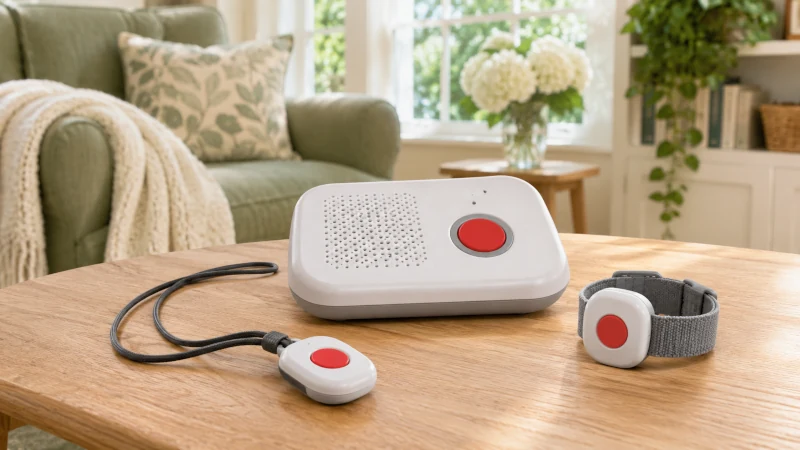
The system has three parts: a base that plugs into a phone jack and a power outlet (it can sit on a table or mount on a wall), a necklace button, and a wrist button. The base has its own large help button too [ATS, n.d.].
When a button is pressed, the base sounds a two-second alarm in the house and then dials your saved numbers in order. While each number rings, it repeats your six-second recorded message, so whoever answers hears it no matter when they pick up. They press any key on their phone to open a two-way speakerphone call. If nobody presses a key, the base hangs up and tries the next number, cycling through the list up to five times. An answering machine won’t stop it, because only a keypress counts as a person answering [ATS, n.d.; ATS manual, n.d.].
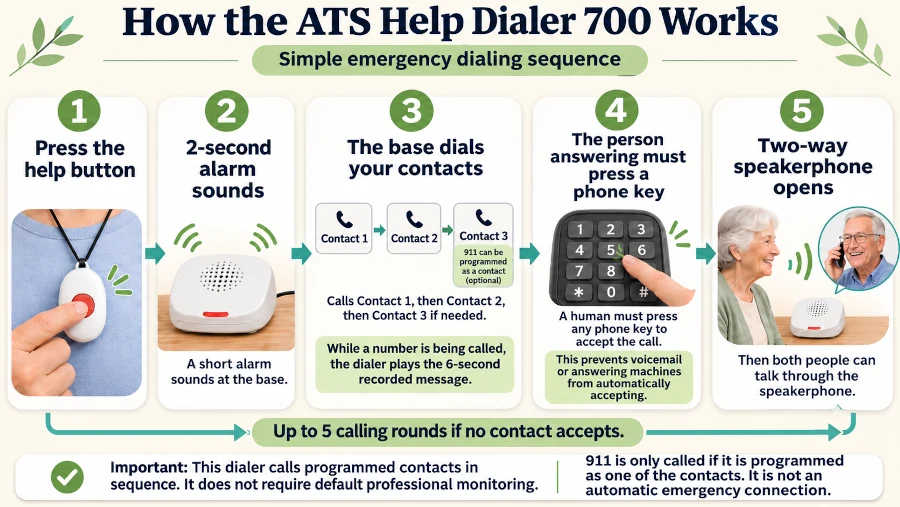
Talk time starts at about 45 seconds. The person you called hears three beeps and can press a key to add another 60 seconds, as often as needed [ATS manual, n.d.]. That’s enough for “I fell in the kitchen and can’t get up” and “I’m on my way.” It isn’t built for long conversations.
The recorded message is the feature people overlook. If a stroke or another problem leaves you unable to speak clearly, the message speaks for you [ATS, n.d.].
ATS Help Dialer 700 specs at a glance
| Feature | What the manufacturer lists |
| Monthly fee | None. An optional paid 24-hour monitoring add-on is sold separately |
| Price | $129.99 on the maker’s site (regular $139.99) when checked November 3, 2026; retailer prices vary |
| Buttons included | One necklace button and one wrist button, plus a help button on the base |
| Who it calls | Up to 3 numbers you program, dialed in order (family, friends, or 911) |
| Range | About 100 feet from the base, depending on walls and layout |
| Water resistance | Both buttons rated for wear in the shower and bath |
| Phone service | Landline; most cable and internet (VoIP) phone lines; a cell phone with an optional Bluetooth adapter, sold separately |
| Power backup | Up to 12 hours on 4 AAA batteries (not included) |
| Button battery | About 2 years, since it only draws power when pressed. Battery types differ between the maker’s documents, so check your manual |
| Pacemakers | The maker says its 433.92 MHz buttons won’t interfere with a pacemaker. We couldn’t verify this independently; ask your cardiology team if you’re unsure |
| Fall detection | No |
| GPS / use away from home | No |
| Warranty and returns | 1-year factory warranty; 30 days to return if not satisfied |
Source: ATS, n.d.; ATS manual, n.d.. Two base versions are sold: the ATS-TN model pairs with two buttons, and the HD700V holds up to eight [ATS, n.d.]. If you plan to add buttons for other rooms, check which one you’re buying.
What it does well
The obvious draw is cost. A monitored system bills you every month for as long as you use it; the Help Dialer 700 is a one-time purchase, and there are no false-alarm fees [ATS, n.d.].
The second is who answers. Calls go to people you picked, not a stranger at a call center. ATS’s own reasoning is that the people you trust should be the first to know [ATS, n.d.]. Some families strongly prefer that, and the person who answers can listen in to tell a real emergency from a bumped button.
It’s also forgiving of a blackout, at least on a traditional landline: with backup batteries installed, the base keeps its programming and can still call out [ATS, n.d.]. And because the buttons are rated for the shower, you can keep one on in the bathroom — the room where the CDC recommends grab bars inside and outside the tub and next to the toilet [CDC, 2026b].
Limits to understand before you buy
No fall detection
The Help Dialer 700 calls only when someone presses a button. If a fall knocks you out, or leaves you confused, frightened, or with the button out of reach, nothing happens. People with a history of fainting, seizures, or falls they can’t remember should look at a system with automatic fall detection and professional monitoring — while knowing that fall sensors miss some falls and trigger on others, as our guide to monitored medical alert systems and their costs explains.
Home only
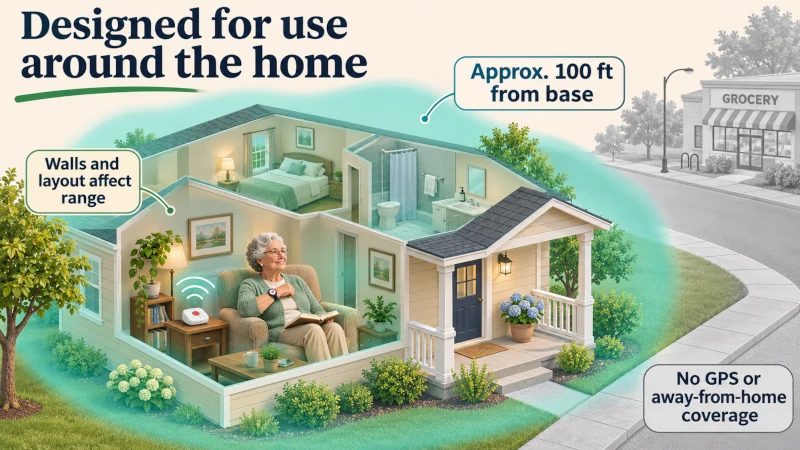
The buttons reach the base from roughly 100 feet away, depending on the walls and layout [ATS, n.d.]. That usually covers a house and often a porch. It won’t cover a walk, the far end of a long driveway, or a trip to the store, and there’s no GPS.
Only as good as your contact list
The dialer can’t send help by itself. It relies on someone answering and acting. If your contacts work long shifts, silence their phones at night, or live an hour away, the gap between a button press and a person at the door can be long. After five rounds with no keypress, the base stops and goes back to standby [ATS manual, n.d.]. Putting 911 on the list is the backstop; ATS suggests the third slot [ATS, n.d.].
Your phone service is part of the system
The base battery keeps the dialer itself running in a power cut, but a cable or internet phone line typically runs through equipment that needs household power. The FCC warns that internet-based (VoIP) phone service may not work during a power outage or when the internet connection fails [FCC, n.d.]. If that’s your setup, ask your provider about battery backup for its equipment, or keep another way to call. ATS says the unit works with most VoIP and cable lines — not all — so test it on yours [ATS, n.d.].
Short calls and accidental presses
The person you called has to keep extending the 45-second talk window. And a button worn on the wrist can get pressed by accident. To cancel an alert, slide the power switch on the base to Off [ATS, n.d.].
Why fast help after a fall matters
Falls are common and often serious. More than one in four adults 65 and older falls each year, fewer than half tell their doctor, and one fall doubles the chance of another. About 37% of people who fall report an injury that needed treatment or limited their activity for at least a day, and falls are the most common cause of traumatic brain injury in older adults [CDC, 2026a].
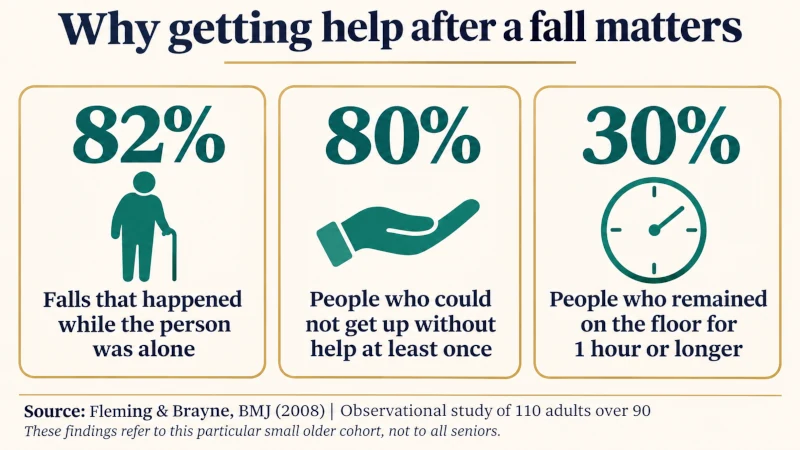
How long someone stays on the floor afterward matters too. A UK study followed 110 people over age 90 for a year. Most falls (82%) happened when the person was alone. Of those who fell, 80% couldn’t get up without help at least once, and 30% had lain on the floor for an hour or more. These “long lies” were strongly associated with serious injury, hospital admission, and moving into long-term care [Fleming & Brayne, 2008].
The same study carries a warning for anyone buying an alert button. Call alarms were widely available to participants, yet they weren’t used in most of the falls that led to a long lie. People described the alarms as irrelevant to them, worried about their independence, or ran into practical problems [Fleming & Brayne, 2008]. A button in a drawer does nothing.
Keep that evidence in proportion. It’s one small observational study of the very oldest adults, and it doesn’t show that owning an alarm prevents injury. What it supports is narrower and practical: wear the button — at night and in the bathroom too — and decide in advance that you’ll press it.
The study also found that cognitive impairment was the only factor that predicted a long lie [Fleming & Brayne, 2008]. If you’re buying for someone with memory problems, a button they must remember to press may not be enough. Our guide to memory health in seniors covers the warning signs worth raising with a doctor.
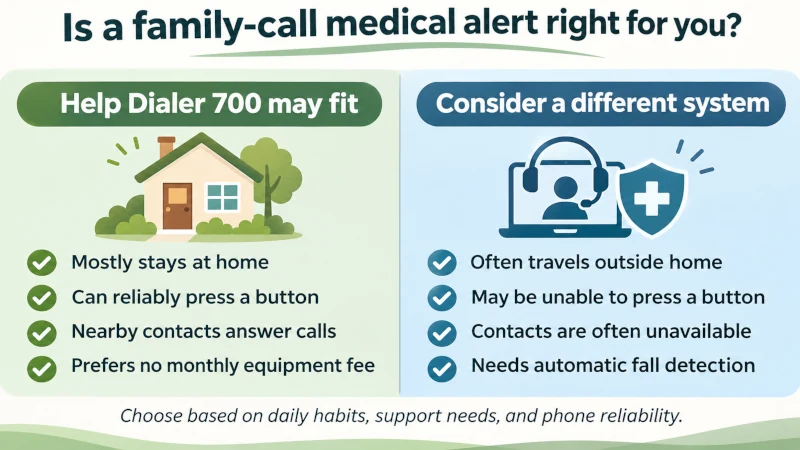
Who the Help Dialer 700 suits, and who should choose something else
| Likely a good fit | Probably choose something else |
| Spends most of the day at home | Active outside the home most days |
| Can reliably press a button and is willing to | Has dementia, fainting spells, seizures, or falls they can’t recall |
| Family or neighbors nearby who pick up | Contacts live far away or are often unreachable |
| Has a working landline, or a VoIP line that’s been tested | Has no dependable phone service at home |
| Wants to avoid a monthly bill | Wants a trained operator to answer every time |
| Speech may be affected (the recorded message helps) | Needs automatic fall detection |
ATS also sells an optional 24-hour professional monitoring service for this dialer [ATS, n.d.]. We didn’t review its terms or price, so ask the company directly if that’s part of your decision.
Not sure? Try one first. Florida’s federally funded assistive technology program, FAAST, lists the Help Dialer 700 in its device-loan library [FAAST, 2022]. Your state may run a similar program, and the Eldercare Locator (1-800-677-1116) can connect you with local services for older adults [ACL, n.d.].
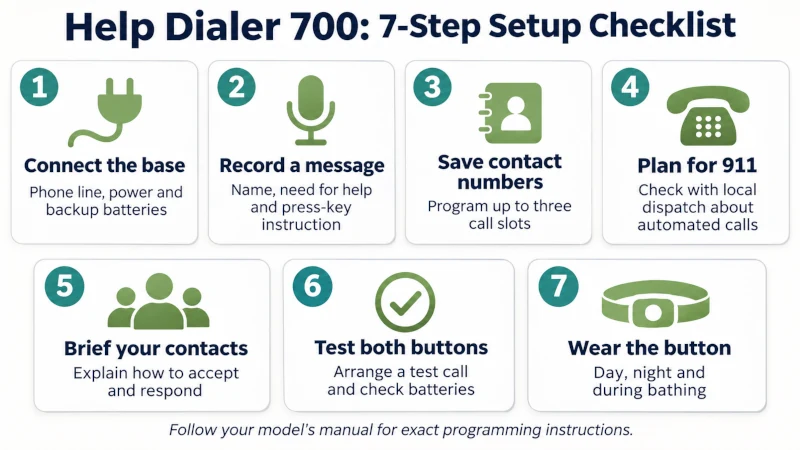
How to set it up so it works when you need it
- Connect it. Plug the base into a phone jack and a power outlet, then put four AAA batteries in the back for backup power [ATS manual, n.d.].
- Record a useful message. You get six seconds. Say who you are, that you need help, and to press a key to talk. If 911 is on your list, ATS suggests adding how responders can get in, such as a lockbox code or where a key is hidden [ATS, n.d.].
- Program the numbers in order. If you’re only using one number, the manual says to save it in all three slots — otherwise the unit stops after the first call [ATS manual, n.d.].
- Decide where 911 goes. ATS suggests the third slot [ATS, n.d.]. An automated call behaves differently from a normal one, so it’s sensible to call your local non-emergency line and ask how dispatchers handle it.
- Brief your contacts. Tell them the call starts with a recorded message, that they must press a key to talk, and what to do next: drive over, call 911, or both.
- Test it. Run a test call with your contacts expecting it. Check each button’s battery by holding the button for 10 seconds; if the light doesn’t stay on the whole time, replace the battery [ATS manual, n.d.].
- Wear it. Day, night, and in the shower.
Lowering the chance of a fall in the first place
An alert button helps after a fall. Preventing the fall is a separate job, and the CDC’s advice is specific [CDC, 2026b]:
- Ask your doctor to assess your fall risk, and have a doctor or pharmacist review all your medicines, including over-the-counter ones, for any that cause dizziness or sleepiness.
- Ask whether you should take vitamin D, and get screened for osteoporosis.
- Do exercises that strengthen your legs and improve balance. Tai chi is one example.
- Have your eyes checked at least once a year and keep your glasses up to date.
- Clear tripping hazards, add grab bars by the tub, shower, and toilet, put railings on both sides of stairs, and brighten the lighting.
Our fall prevention guide for older adults covers home safety in more detail.
When to skip the family call and dial 911
The dialer calls the people on your list. It doesn’t judge how serious things are. Call 911 directly, or have someone call, if a fall comes with any of these:
- A blow to the head, especially for anyone taking blood thinners. The CDC advises that an older adult who falls and hits their head see a doctor right away [CDC, 2026a].
- Passing out, even briefly, or new confusion.
- Severe pain, a limb at an odd angle, or not being able to stand or put weight on a leg.
- Chest pain, trouble breathing, sudden weakness on one side, a drooping face, or trouble speaking.
- Being unable to get up with no one on the way.
Even if you feel fine, tell your doctor about any fall. Fewer than half of older adults who fall do, and one fall raises the odds of another [CDC, 2026a].
| HEALTH DISCLAIMER: This article is general information, not medical advice. The ATS Help Dialer 700 is a communication device; it doesn’t diagnose, treat, or prevent any condition, and it isn’t a substitute for 911 or medical care. Product features, prices, and phone-line compatibility can change, so confirm details with the manufacturer before you buy. Talk with your doctor about your own fall risk. In an emergency, call 911. See our full medical disclaimer. |
Frequently Asked Questions
Does the ATS Help Dialer 700 have a monthly fee?
No. You pay once for the equipment. The maker offers an optional paid 24-hour monitoring add-on, but the dialer works without it [ATS, n.d.].
Does the Help Dialer 700 detect falls automatically?
No. It only calls when someone presses the necklace, wrist, or base button. If automatic fall detection matters, you’ll need a different kind of system.
Can the Help Dialer 700 call 911?
Yes. You can program 911 as one of the three numbers; ATS suggests putting it third so family is tried first [ATS, n.d.]. Consider asking your local non-emergency line how dispatchers handle automated calls.
Does it work without a landline?
What happens if nobody answers?
The base calls each number in turn and keeps cycling through the list up to five times until someone presses a key, then goes back to standby [ATS manual, n.d.].
Yes. The maker rates both the necklace and wrist buttons for showering and bathing [ATS, n.d.].
| Where to buy The Help Dialer 700 is sold directly by Assistive Technology Services on its Help Dialer 700 product page and through retailers, including this Amazon listing. Prices and base versions (ATS-TN or HD700V) vary by seller, so confirm the model and return terms before you order. Natural Health Message may earn a commission on purchases made through some links; see our advertising disclosure. |
References
- Assistive Technology Services. HELP Dialer 700 [product page]. View source
- Assistive Technology Services. Help Dialer 700 Manual (v101222) [PDF]. View source
- Centers for Disease Control and Prevention. Facts About Older Adult Falls. View source
- Centers for Disease Control and Prevention. Preventing Falls and Hip Fractures. View source
- Fleming J, Brayne C; Cambridge City over-75s Cohort (CC75C) study collaboration. Inability to get up after falling, subsequent time on floor, and summoning help: prospective cohort study in people over 90. View source
- Federal Communications Commission. VoIP and 911 Service. View source
- Administration for Community Living. Eldercare Locator. View source
- Florida Alliance for Assistive Services & Technology (FAAST). Help Dialer 700 [device loan listing]. View source