
AARP does not make, sell, or run its own medical alert system, and it does not endorse a single brand. So if you’ve been searching for “AARP medical alert systems” expecting a device with the AARP logo on it, here’s the short version: what AARP actually offers its members is a discount on a third-party system — currently 15% off monthly monitoring with Lifeline, plus free shipping and free activation [Lifeline, 2025]. AARP encourages older adults to consider these devices, but the buying decision, the equipment, and the 24/7 monitoring all come from the company you choose [AARP, 2026].
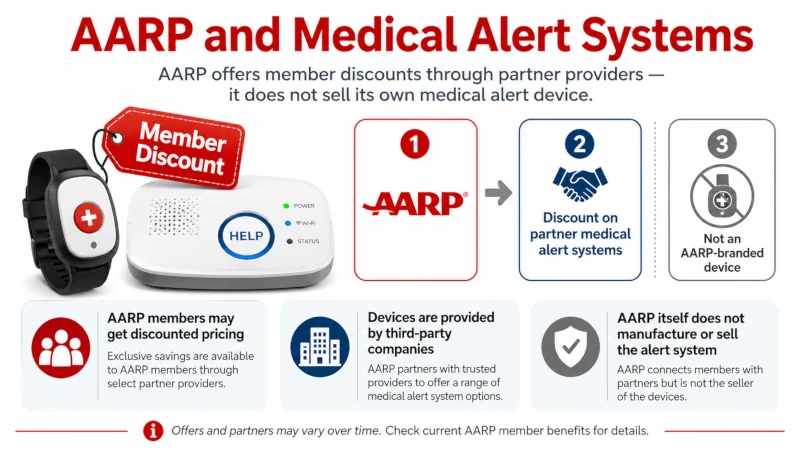
That distinction matters, because a lot of pages online blur it. Knowing how the benefit really works helps you avoid overpaying and steers you toward a device that fits your life rather than one that fits an ad.
Does AARP have its own medical alert system?
No. AARP is a membership and advocacy organization, not a device manufacturer or a monitoring company. It recommends that older adults — especially those who live alone or have a health condition that raises the risk of a sudden emergency — think about a personal emergency response system, often shortened to PERS. A PERS is the wearable button-and-monitoring setup most people picture when they hear “medical alert” [AARP, 2026].
When you see something marketed as an “AARP medical alert system,” it’s a system from a separate company (such as Lifeline, Bay Alarm Medical, or MobileHelp) that offers a discount to AARP members. The AARP connection is a price break, not a product.
The AARP medical alert systems member discount, explained
The clearest, currently active AARP benefit is with Philips Lifeline. Active AARP members get 15% off the monthly monitoring fee, along with free shipping and free activation [Lifeline, 2025]. Because that discount applies to the recurring monthly cost rather than a one-time purchase, the savings add up over the months and years you use the service.
Other companies sometimes run their own AARP-member promotions, but these come and go. Some brands have offered seasonal deals tied to events like Older Americans Month, and a few advertise member pricing on equipment or monitoring [U.S. News, 2025]. None of this means AARP has vetted or ranked those companies. The practical takeaway: pick the system that fits your needs first, then ask that specific company whether it has an AARP-member discount right now.
One caution worth keeping in mind. Many websites that rank for “AARP medical alert” are affiliate pages that earn a commission when you click through and buy. That isn’t automatically bad, but it can tilt the recommendations. Compare on features, cost, and contract terms before you let any discount drive the decision.
How to claim the discount
For the Lifeline benefit, you verify your AARP membership during checkout on Lifeline’s AARP member page, using your membership number and last name [Lifeline, 2025]. For any other brand, call the company directly, confirm you’re an AARP member, and ask what discount applies before you sign up. Discounts change, so confirm the current offer rather than relying on an older article.
How a medical alert system actually works
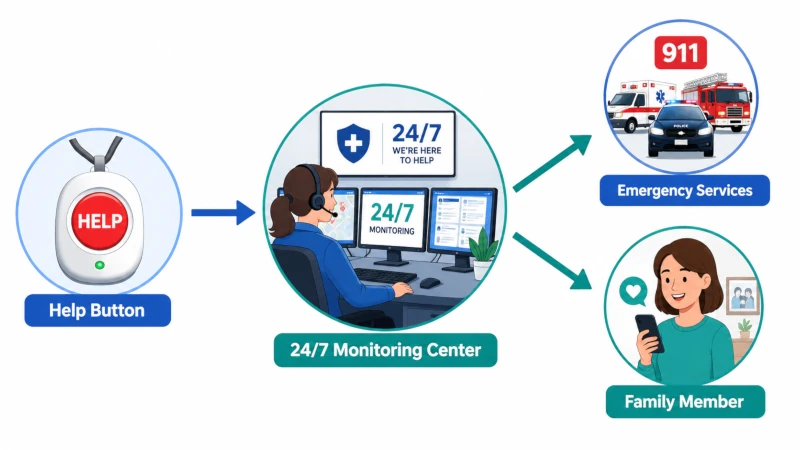
Most systems share the same basic design. You wear a help button as a pendant or wristband. Pressing it connects you to a 24/7 monitoring center, where a trained operator speaks with you, decides what kind of help you need, and can dispatch emergency services or call a family member you’ve listed.
The main differences are about where you need coverage:
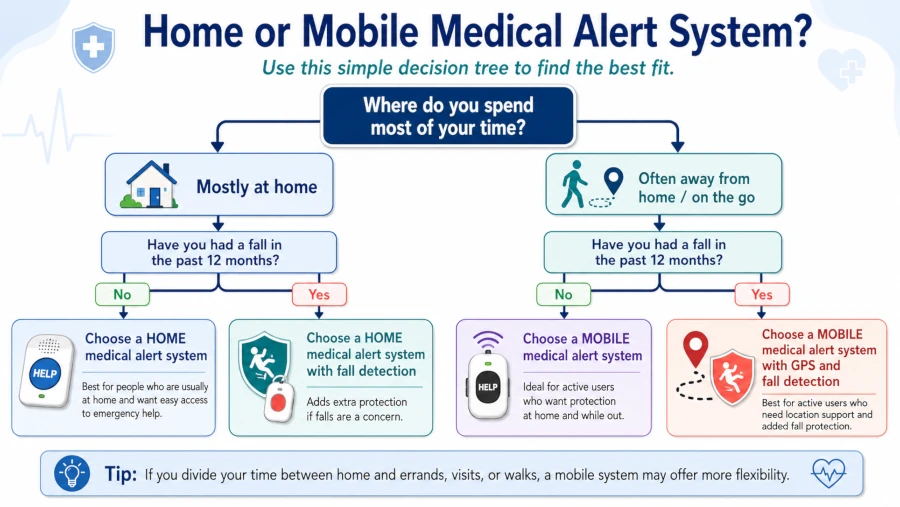
- Home systems use a base unit that connects through a landline or cellular signal and works within a set range of the house, often up to about 1,400 feet [NCOA, 2026].
- Mobile systems use cellular service and GPS so you’re covered away from home, which is why they usually cost a bit more.
- Fall detection is an add-on (or built-in feature) that can send an alert automatically if the device senses a fall, even if you can’t press the button.
Setup is generally simple — plug in the base unit or charge the wearable, follow the test instructions, and you’re connected. You don’t need technical skill to use one.
What medical alert systems cost in 2026
There’s no single “AARP price,” because there’s no AARP device. What you pay depends on the company, the type of system, and the features you add. Here’s the current landscape from independent reviewers:
| Cost item | Typical 2026 range | Notes |
|---|---|---|
| Monthly monitoring (home) | $25–$35 | Landline or cellular base unit [NCOA, 2026] |
| Monthly monitoring (mobile/GPS) | ~$10–$20 more than home | Adds cellular and location tracking [SeniorLiving, 2026] |
| Fall detection add-on | $5–$12 per month | Sometimes bundled into mobile devices [NCOA, 2026] |
| One-time equipment or activation fee | $0–$200 | Many companies waive equipment fees; activation fees, when charged, run around $100 [SeniorLiving, 2026] |
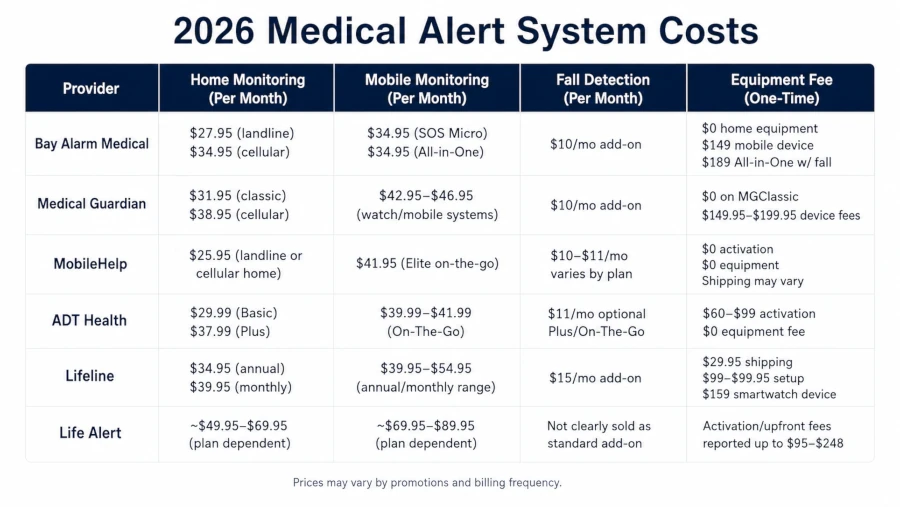
Annual or quarterly payment often lowers the monthly rate and can waive equipment fees. Watch for the opposite warning sign too: very long contracts with steep early-termination penalties. A flexible, no-contract plan is generally easier to leave if the device doesn’t work out.
The AARP-member discount, where it applies, comes off the monthly monitoring fee — so it lowers the recurring cost, not the equipment.
Fall detection: helpful, but know its limits
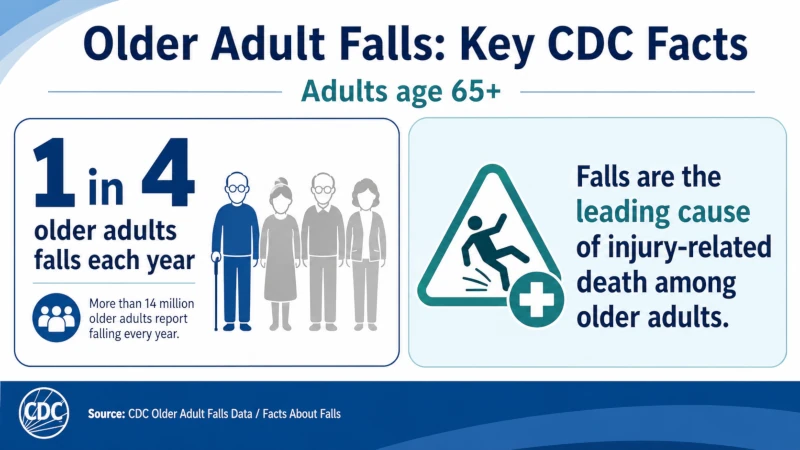
Falls are a serious risk for older adults. About one in four adults age 65 and older falls each year, and falls are the leading cause of injury-related death in this age group, with roughly 3 million emergency department visits and around 1 million hospitalizations annually in the United States [CDC, 2026]. Getting help quickly after a fall can reduce the time a person spends on the floor, which matters for outcomes.
Automatic fall detection is built to help with exactly that — alerting the monitoring center when you may not be able to press the button yourself. But it’s worth being clear-eyed about what the technology does and doesn’t do. A 2025 systematic review of digital fall-detection approaches found that these systems improve monitoring and are well accepted by users, yet the evidence that they actually reduce injurious falls is inconsistent and limited, and frequent false alarms are a recurring problem [Systematic review, 2025].
Two practical points follow from that. First, fall detection is a response tool, not a fall-prevention tool — it doesn’t stop falls from happening. Second, no fall sensor catches every fall, and some trigger when you haven’t fallen at all. Treat it as a useful safety net rather than a guarantee, and pair it with the steps that actually lower fall risk: strength and balance exercise, a home-safety check, a medication review with your pharmacist or doctor, and an up-to-date vision check.
Will Medicare or insurance pay for it?
This is where a lot of online information is wrong, so here’s the accurate picture:
| Coverage source | Does it help pay? |
|---|---|
| Original Medicare (Part A and Part B) | No — not covered [SafeWise, 2026] |
| Medicare Advantage (Part C) | Sometimes, as a supplemental benefit; varies widely by plan and carrier [SafeWise, 2026] |
| Medicaid | Possibly, in some states through a Home and Community-Based Services waiver; varies by state [SafeWise, 2026] |
| Long-term care insurance | May reimburse part or all, depending on your policy |
| Veterans (VA) | May be available; ask at your VA facility [SafeWise, 2026] |
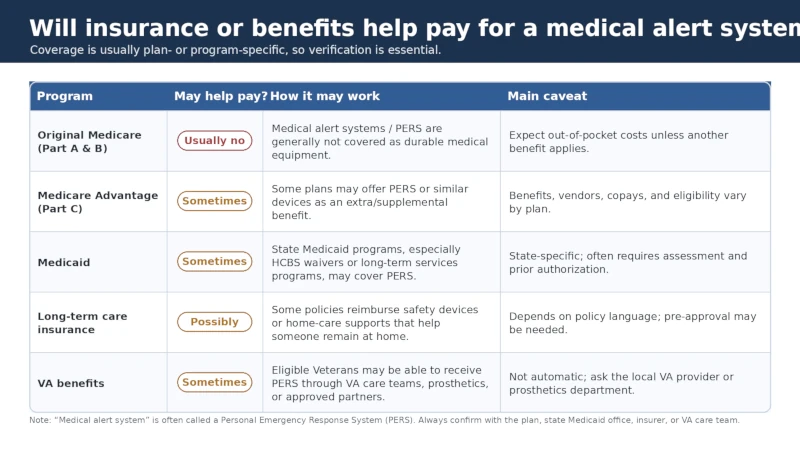
Your local Area Agency on Aging is a useful free resource for sorting through these options and finding local programs. You can locate yours through the federal Eldercare Locator. These agencies can point you toward providers and sometimes toward financial help, without selling you anything.
How to choose the right system
A few questions narrow the field quickly:
- Where do you need coverage? Mostly at home points to a home system; an active life outside the house points to a mobile GPS device.
- Do you want fall detection? If you have a history of falls or balance problems, it may be worth the monthly add-on — with the limits above in mind.
- What are the contract terms? Favor month-to-month or short commitments and avoid plans with heavy cancellation penalties.
- Is there a trial period? A 14- to 30-day trial lets you test the device, the operators, and the response time before committing.
- Will it work for you physically? Because these systems rely on speaking with an operator, someone with significant hearing or speech difficulty may need a device designed with that in mind. Also check water resistance (so it can be worn in the shower, where falls are common) and battery life.
Reading recent, independent customer reviews — not just testimonials on a company’s own page — helps you spot patterns in response time and reliability.
Safety, limitations, and when to call 911
A medical alert system is a tool for getting help faster, not a replacement for emergency services or regular medical care. In a serious emergency, call 911 directly if you can. Use the medical alert button when you can’t reach a phone or aren’t sure how serious the situation is and need someone on the line quickly.
Call 911 (or have someone call) without delay for warning signs such as:
- Chest pain or pressure, or pain spreading to the arm, jaw, or back
- Sudden trouble speaking, face drooping, or weakness on one side of the body
- Trouble breathing
- A fall with a head injury, a possible broken bone, or any loss of consciousness
- Heavy bleeding that won’t stop
- Sudden confusion or a seizure
A medical alert device can connect you to help in these moments, but the help still needs to come from emergency responders. The device’s job is speed, not treatment.
Who should consider a medical alert system
These devices tend to help most for people who live alone, have a history of falls, manage chronic conditions, or have limited mobility. A mobile system with GPS can also help families locate a loved one with dementia who may wander [CDC, 2026]. If you’re not sure whether you’d benefit, a clinician or physical therapist can do a fall-risk assessment and talk through whether a device fits your situation alongside other prevention steps.
Health Disclaimer: This article is for general educational purposes only and is not medical advice. It does not diagnose, treat, or prevent any condition, and it is not a substitute for care from a qualified healthcare professional. Medical alert systems are not a replacement for 911 or routine medical care. Product features, pricing, discounts, and insurance coverage change often; confirm current details directly with the provider, your insurer, or your plan before making a decision. Talk with your doctor about your individual fall risk and health needs. In an emergency, call 911 or your local emergency number.
Frequently Asked Questions
Is there an official AARP medical alert system?
No. AARP doesn’t manufacture, sell, or monitor a medical alert system, and it doesn’t endorse one specific brand. It offers members a discount on a third-party service — currently 15% off Lifeline’s monthly monitoring, with free shipping and activation [Lifeline, 2025; AARP, 2026].
How much is the AARP discount, and which company is it with?
The clearest active benefit is 15% off monthly monitoring with Philips Lifeline, plus free shipping and free activation, verified at checkout with your AARP membership number [Lifeline, 2025]. Other companies sometimes offer their own AARP-member promotions, so it’s worth asking each provider directly.
Does Medicare pay for a medical alert system?
Original Medicare does not. Some Medicare Advantage plans may cover one as a supplemental benefit, and some state Medicaid programs may help through a waiver. Coverage varies, so check your specific plan [SafeWise, 2026].
Does fall detection actually work?
It can alert a monitoring center automatically when you may not be able to press the button, which helps you get help sooner. But current research shows the evidence that fall detection reduces injurious falls is inconsistent, and false alarms are common. No sensor catches every fall, so treat it as a safety net, not a guarantee [Systematic review, 2025].
What does a medical alert system cost in 2026?
Monthly monitoring generally runs $25–$60 depending on whether it’s a home or mobile system. Fall detection usually adds $5–$12 a month, and some companies charge a one-time equipment or activation fee of up to about $200 — though many waive equipment fees [NCOA, 2026; SeniorLiving, 2026].
Can I get help choosing one for free?
Yes. Your local Area Agency on Aging offers free guidance and can point you to local providers and possible financial assistance. You can find yours through the federal Eldercare Locator.
References
- AARP. Medical Alert Systems: Choosing the Best Option. View source
- Lifeline. AARP Medical Alert Benefits. View source
- Centers for Disease Control and Prevention. Older Adult Falls Data. View source
- Centers for Disease Control and Prevention. Facts About Falls. View source
- National Council on Aging. Best Medical Alert Systems (2026). View source
- SeniorLiving.org. Average Medical Alert System Costs in 2026. View source
- Digital Healthcare Approaches for Fall Detection and Prediction in Older Adults: A Systematic Review (2025). View source
- SafeWise. Are Medical Alert Systems Covered by Medicare? View source
- U.S. News. Best Medical Alert Systems for AARP Members. View source
